 BAGAS31 – PUB Gfx Tool v0.15.3p Apk Plus Version. Hallo sobat. Beberapa hari lalu saya pernah post mengenai PUB Gfx Tool v0.15.2p. Nah, baru-baru ini pihak developer meng-update versi terbarunya yaitu v0.15.3p. Untuk sobat yang belum tahu, PUB Gfx Tool adalah aplikasi/tools di Android yang sangat bermanfaat untuk mengoptimalkan gaming experience serta grafik, ketika sobat bermain PUBG Mobile. Ukurannya kecil, hanya 2 MB.
Tools ini sangat bermanfaat untuk sobat terutama pengguna low-end device agar bisa mendapatkan setting grafik terbaik. Di Playstore ada 2 versi, yang gratis dan berbayar (versi Plus). Untuk versi berbayarnya, sobat akan mendapat fitur tambahan yaitu Advance Settings. Untuk men-download PUB Gfx Tool v0.15.3p Apk Plus Version serta mengetahui fitur Advance Settings-nya, silakan simak detail berikut.
PUB Gfx Tool v0.15.3p Apk Plus Version
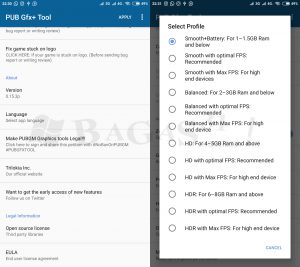
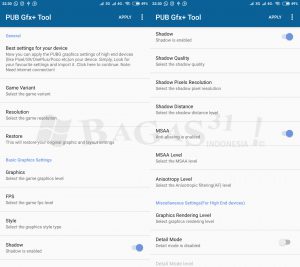
Screenshots:
Download :
- PUB Gfx Tool v0.15.3p Apk Plus Version
[Speed Up Download] | [Google Drive] - Password: www.bagas31.info | Status: Tested (Xiaomi Mi 5)
What’s New v0.15.3p?
- Updated to 0.8.x(Gn, Kr), 0.9.x(Gn Beta), 0.10.x(Ch) versions.
- Added “Best Setting with Search” option: Now you can enjoy graphics settings of high end device like Pixel/S9/OnePlus/Poco/Note 9/Razer/Xperia XZ3/Moto Z2/OppoF9/Vivo NEX/Honor 9/Huawei P20 etc on your device.
- Added Safe Mode: Enjoy high graphics without worrying about getting BAN.
- Added Potato Graphics(Minimal texture]), Color rendering level(32/64Bit) etc.
Basic Graphics Settings :
- 1080 Resolution: Change the resolution of the game.
- HDR Game Graphic: Unlock the HDR graphics on low end devices.
- Extreme FPS: Unlock the Extreme FPS level.
- Style: Change graphics style setting.
- Shadow:.Enable and disable shadow.
- Shadow Quality: Select the shadow quality.
- Shadow Resolution(Pixel): Change the size of shadow pixel.
- 4xMSAA: Enable and disable Anti Aliasing.
- MSAA Level: Select the MSAA Level.
- Anisotropy Level: Select the Anisotropic filtering(AF) level.
Miscellaneous Settings :
- Graphics Rendering Level: Enhance the quality of graphics.
- Detail Mode: Change the detail of graphics with different profiles.
- Light Effects: Enable/disable light effects in game.
- Save My Layout & Sensitivity Settings: Prevent resetting of game layout & sensitivity settings.
Advance Settings (Plus Version):
- Zero Lag Mode + Battery Efficient: Optimized game configuration.
- Graphic Profile: Now choose graphic according to RAM size.
- Hardware-Accelerated Rendering: Enable support for VULKAN and OPENGL 3.1+.
- GPU Optimization: Custom OpenGL shaders.
- Memory Boost: Boost up the game performance.
- Smart widget: One touch to launch game without opening PUB Gfx+ app again and again.
Panduan Install:
- Download PUB Gfx+ Tool v0.15.3p melalui link di atas.
- Masuk ke Setting > Security, ijinkan Unknown Source (Sumber tidak diketahui).
- Jika ada versi lama jangan dihapus dan cobalah install versi terbaru v0.15.3p. Jika gagal, silakan hapus/uninstall versi lama terlebih dahulu.
- Buka aplikasi PUB Gfx+ Tool, atur dan sesuaikan dengan kebutuhan sobat.
- Jika sudah, jangan lupa klik Apply atau Terapkan.
- Otomatis akan diarahkan masuk ke game.
- Selesai. Enjoy!
Semoga bermanfaat.
from BAGAS31 | Download Software Gratis http://bit.ly/2R1u1ms
Source: https://bagas31.info

0 Komentar untuk "PUB Gfx Tool v0.15.3p Apk Plus Version"